

Generate Voice
Turn text into natural speech: choose a voice, style, language and speed.
Open Voice →Turn text into speech
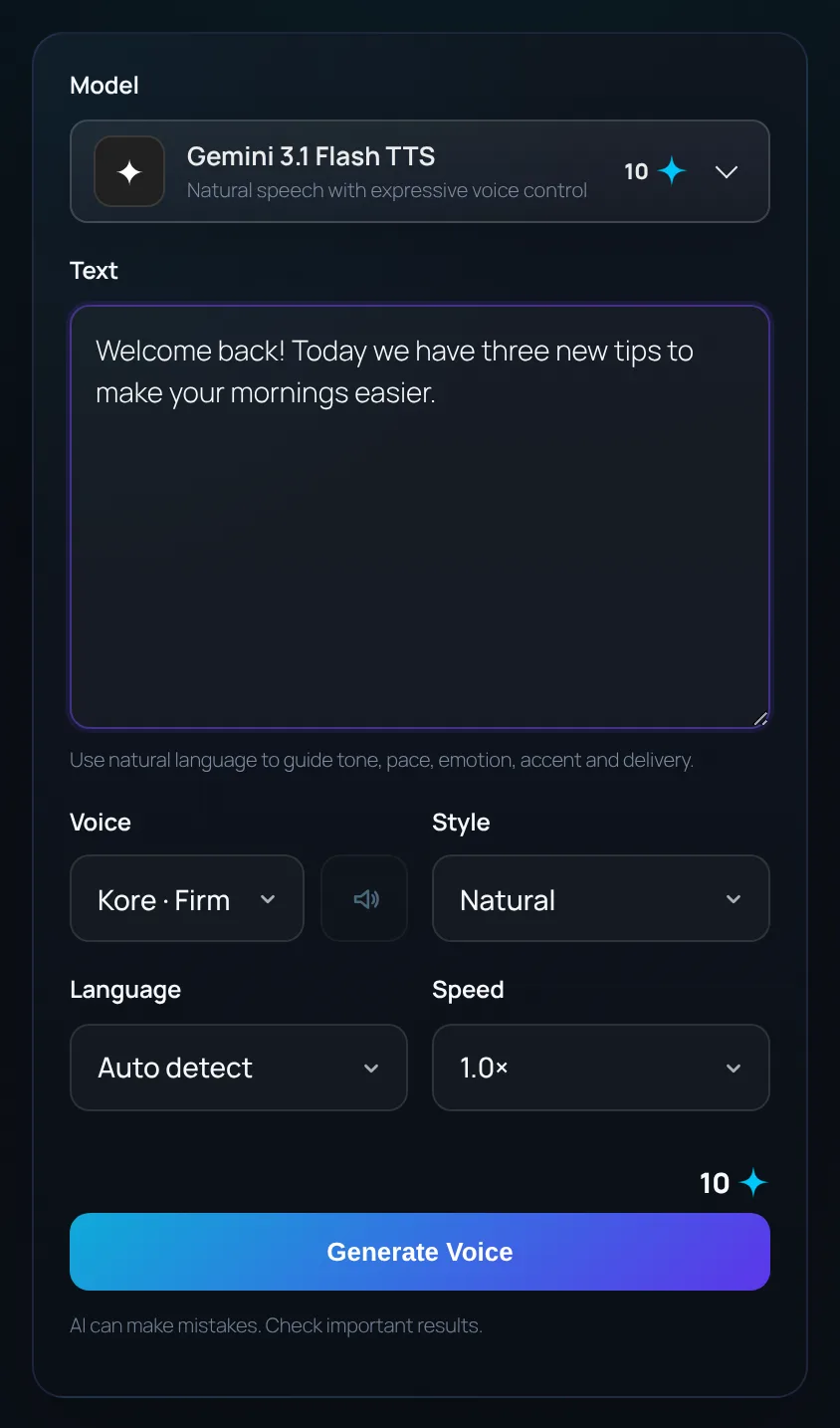
- Open Voice from the left menu and choose a model.
- Type or paste the text to be spoken.
- Choose a Voice. Where available, the speaker button next to it plays a sample.
- Set the Style (natural, warm, energetic, calm, professional, dramatic), Language and Speed, then click Generate Voice.
Direct the delivery
You can guide tone, pace, emotion and accent in plain words, alongside the text. Short sentences and punctuation help the voice pause naturally.
Example
Say this warmly and slowly, like a bedtime story: Once upon a time, in a quiet village by the sea, there lived a little lighthouse keeper.Custom voice
Some models offer a Custom voice: upload one short, clear recording (WAV, MP3, OGG or PCM, up to 10 MB) and the AI speaks your text in a similar voice. Only use recordings of your own voice or voices you have permission to use.
Play, download and reuse
- Play the result in the page and download it as WAV.
- Recent voices are listed on the right. Use Reuse prompt to load one back into the form, or delete it.